How do I renew my subscription?
How do I renew my subscription?
A year with eclipso Mail Europe passes quickly - and to continue using your booked value-added tariff without restrictions, a manual renewal is required. We do not automatically extend your subscription.
We will notify you by email about 14 days before the end of your current term. Within this period, you can easily renew your subscription. You may also renew earlier at any time - the new term will simply be added to your existing one.
How to renew your subscription
- Log in to your account using the desktop version.
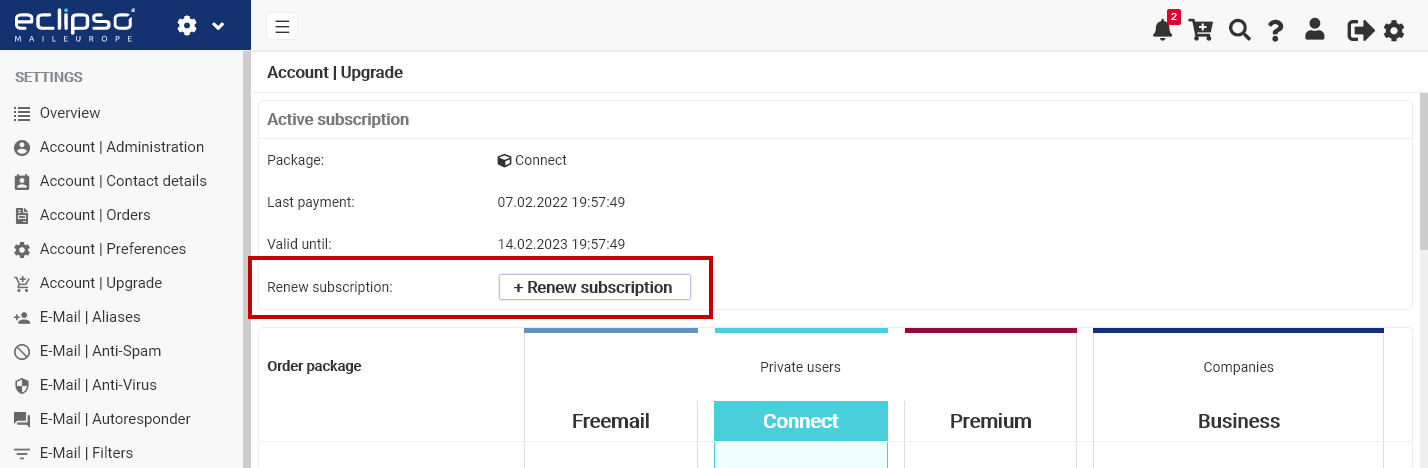
- Open Settings > Account | Upgrade.
- In the Current tariff section, click [ + Renew subscription ].
- Select your preferred payment method.
Payment via PayPal or Credit Card (Stripe)
If you selected PayPal or credit card, you will be redirected to the respective payment provider. Follow the instructions provided. After successful payment, you will automatically be redirected back to eclipso. The upgrade becomes active immediately after payment confirmation.Payment via SEPA Direct Debit (Stripe)
SEPA direct debit is available to new user accounts only after 30 days of account age. Existing users may use SEPA direct debit at any time.Payment in advance (bank transfer)
If you selected payment in advance, our bank details will be displayed after completing the order. Transfer the displayed amount using the specified reference code (VK-). Once the payment has been received, we will activate your upgrade. Always use the current reference code (VK-). A new code is generated for each booking. Payments made with an old or incorrect reference cannot be assigned.
Missed the deadline?
If your value-added tariff is not renewed, your account will automatically revert to the free Freemail tariff. All emails and data remain intact.If your storage usage exceeds the Freemail limit:
- You will no longer be able to receive new emails.
- Sent emails will not be saved in your “Sent” folder.
Related articles: